Add rows inline
Click + and a new empty line appears right in the grid. Fill it in, click save, and the record is created. No form, no context switch.

The editable table your Dynamics 365 grids should have had from day one.
Add new rows with one click, no form pop-ups. Type across cells like in Excel. Color code what matters. Editable Table Premium turns any Dynamics 365 grid into a fast table built for data entry.
Editable Table Premium is a PCF control that sits on top of the standard Dynamics 365 CE grid, on forms and home pages alike. Just add it to your grid and users get a fast table that works like a spreadsheet. Admins and developers keep full control over what can be edited, how it looks and what happens on every change.
Try it free for 14 daysThe standard Dynamics 365 editable grid sends users to a form whenever they add a record, and makes them click into each cell one by one. Editable Table Premium keeps everything in the grid.
Click + and a new empty line appears right in the grid. Fill it in, click save, and the record is created. No form, no context switch.
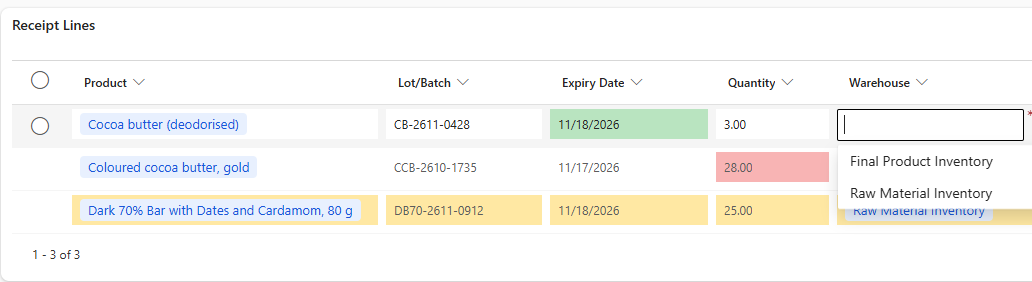
Every cell is ready to type in. Move across the grid the way your users already work in spreadsheets.
Highlight overdue lines, risky values or approved items. Colors follow your rules.
Turn the main list of any table into an editable grid. Add new rows and control every cell with your own JavaScript, without opening a single form.
Lock fields, make them required, filter lookups and show inline error messages, row by row. Toolbar buttons can run your own logic too.
Add it to the grids you already have. Nothing to rebuild, your views stay exactly as they are.
Choose which columns stay read only in each view. No code needed.
If you’ve scripted the native editable grid, you already know the pattern. Hook into grid events, set values, lock fields, filter lookups and show notifications. All from your form scripts.
JavaScript documentation (PDF)| Feature | Standard grid | Editable Table Premium |
|---|---|---|
| Add a new row without opening a form | No | Yes |
| Edit across cells like in Excel | No | Yes |
| Color rows and cells by your rules | No | Yes |
| Add rows and run JavaScript on home page views | No | Yes |
| JavaScript API for business logic | Yes | Yes |