New fields work immediately
Added a column last week? Type its name in the template and it prints. No need to rebuild the whole template.
{{bvr_new_field}}

Turn any Dynamics 365 data into a finished Word document.
Type {{placeholders}} in Word, upload the file, and generate any document you need: quotes, contracts, certificates or a full production dossier. Pull in related records at any depth, bring filtered and sorted data from Dynamics 365 straight into table rows with totals, and show or hide paragraphs, rows or whole pages based on the record's values. Need a new field later? Just type it into the template. There's nothing to rebuild.
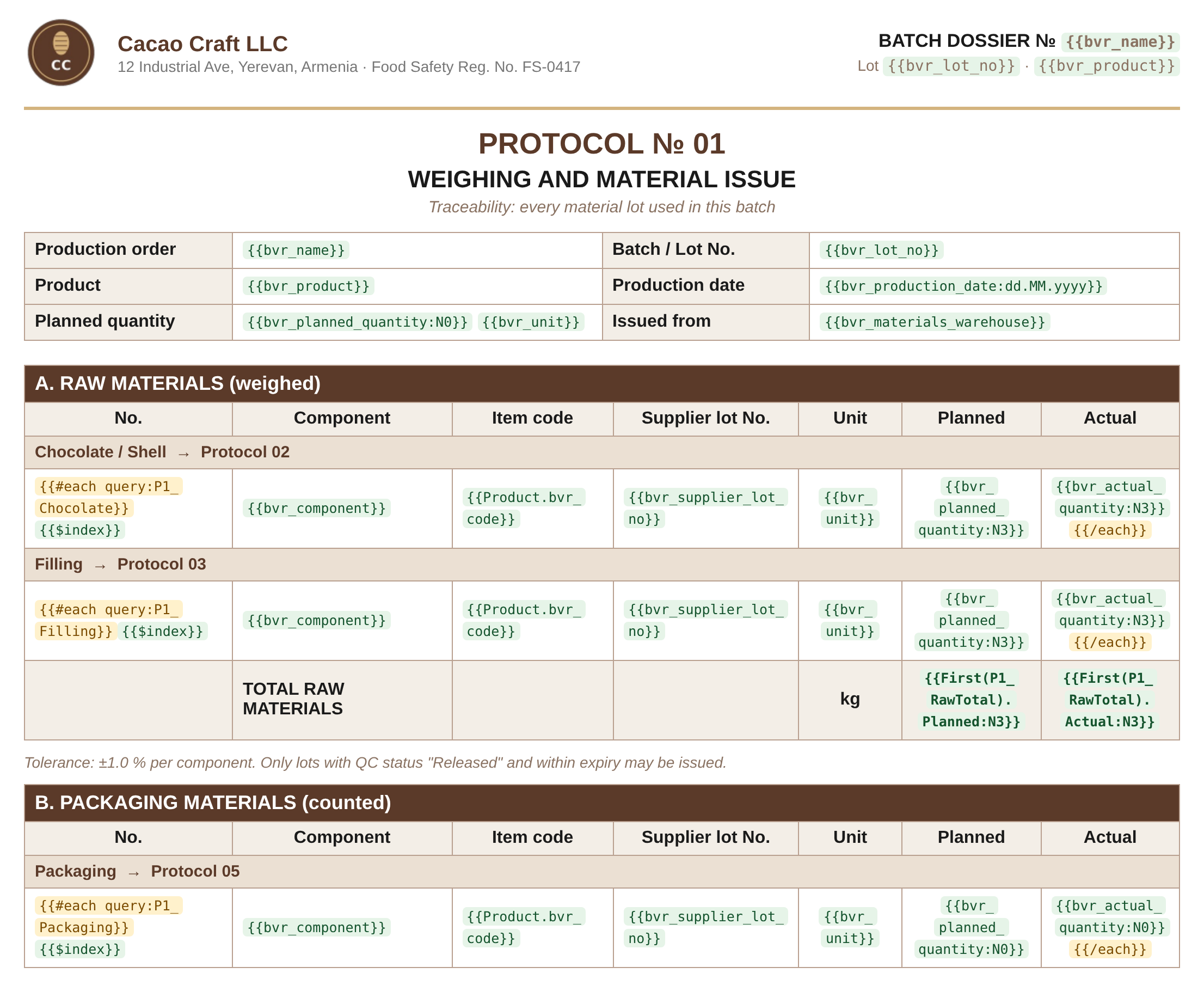
Built-in Microsoft Word templates cover the basics. Advanced Word Template adds nested tables, per-value formatting and conditional checks inside the document with {{#if}}. Build FetchXML queries and repeat their results as table rows or whole paragraphs with {{#each}}, and set rules for which records show the Generate Document button.
Try it free for 14 daysThe built-in Dynamics 365 Word templates read one record and a few child tables. Real business documents need more: parents and children at any level, filtered and sorted data in table rows with totals, and conditional checks inside the template.
{{#if}}: show or hide paragraphs, rows or pages based on the record's values.Added a column last week? Type its name in the template and it prints. No need to rebuild the whole template.
{{bvr_new_field}}
Follow lookups as far as you need, with no limit on levels. Standard templates stop at one.
{{ownerid.businessunitid.name}}
Reach children, and children of children, through 1:N and N:N relationships. Not just the relationships chosen when the template was made.
{{[contact^parentcustomerid].fullname}}
Filter, sort and join across tables, and add totals with sum, count, average, min, max and group by. No 100-row limit.
{{#each query:OpenOrders}}
Nest repeating rows to any depth: orders, their lines, each line's lots. $parent and $root reach back to the record above.
Print different text based on a field value with If(…), and show or hide whole paragraphs, rows or pages with {{#if}} … {{#else}} … {{/if}}.
Build names, addresses and labels from several fields: {{firstname + " " + lastname}}.
Print the current user, today's date, the time, the row number and the row count.
Dates dd.MM.yyyy, numbers N3, signed values +0.00;-0.00, Yes/No as Passed/Failed or a checkmark, and currencies.
Choose per template: read with full access so a document is never incomplete, or limit it to what the user is allowed to see.
Because placeholders are plain text, Claude can write them for you. Give it your document and your Dynamics 365 tables, and it maps every value, writes the placeholders and creates the queries. No field-by-field mapping, no syntax to learn.
Download the skill and upload it in Claude under Customize, Skills. It teaches Claude the template syntax and the layout rules.
Upload the Word file you use today, with sample values in it.
Add the Dataverse connector, so Claude can read your tables, fields and relationships.
Point it to your sample file and the tables the data should come from, like the prompt below.
“Create a Word template based on this sample file. Replace every value with data from these tables: Account, Contact, Lead, Opportunity, Quote and Invoice. Create the queries you need and send me the Word template.”
| Feature | Standard Word templates | Advanced Word Template |
|---|---|---|
| New fields without rebuilding the template | No | Yes |
| Lookups of lookups | 1 level | Unlimited |
| Related records at any depth, 1:N and N:N | No | Yes |
| Filter, sort and total related lists | No | Yes |
| Rows per related list | 100 | No limit |
| Tables inside tables | No | Yes |
| Conditional paragraphs, rows and pages | No | Yes |
| Formats per placeholder | No | Yes |
| System or User scope per template | No | Yes |
| One file from up to 250 records | No | Yes |
| Templates built with Claude | No | Yes |
A document generation solution for Dynamics 365 CE and Power Apps model-driven apps. You design a Word file with {{placeholders}}, attach it to a template record, and users generate finished documents from any record with one click.
No. Documents are generated inside your own Dynamics 365 environment, in memory, and saved back to it. Record data is never sent to Bever or any outside service.
No. Placeholders are typed into Word as plain text. For filtered or totalled tables you add a FetchXML query, which you can build with Dynamics 365's Advanced Find or ask Claude to write.
Yes. Related records can be reached at any depth through both 1:N and N:N relationships, as single values or as repeating tables nested inside each other.
Yes. Because the syntax is plain text, Claude can map your existing Word document to your Dynamics 365 fields, write the placeholders and create the queries. You review the result and generate it on a real record.
Yes. Queries return sums, counts, averages, minimums and maximums, grouped if you need. You can then show the results in the template: one value with First(…), or a list of rows with {{#each}}.
Yes. Select up to 250 records in a grid and get one file, with each record on its own pages, headers and footers included.
Yes. Availability rules decide which records a template appears on, for example only completed orders, and they're enforced on the server.
It depends on the template's scope. In System scope, the default, the data is read with system administrator access, so the document is always complete, even if the user can't open some of the records it uses. This suits invoices and contracts. In User scope, the data is read with the user's own permissions, so the document shows only what that person could see in Dynamics 365.
Try it free for 14 days. You'll be asked for your card details when you start the trial, but nothing is charged during the trial, and you can cancel at any time before it ends. After that it's $40 per month with unlimited users and up to 3 instances, and you can still cancel anytime.